
When Enterprise Software Becomes the Constraint
How fragmented systems restrict completed work—and how focused integration and AI assistance can help restore flow.
Watch the narrated introduction, then explore the operating model below.
A customer approves a job. Sales marks it won. Operations cannot release it because the approved scope is buried in an email thread. Purchasing has the material status under another reference. The field team works from an older revision. Finance receives a completion notice without the documentation needed to invoice.
Every department has software. The business still depends on people to copy, reconcile, interpret, and chase information between applications. Those people become the integration layer. When their attention runs out, work waits.
The constraint may sit in the enterprise system itself: the combination of applications, records, operating rules, permissions, and handoffs that governs how work moves. A capable tool can become part of a poorly designed system when it is configured around departmental activity rather than completed customer value.
Five ways systems restrict throughput
- Conflicting records: different job identifiers, scope revisions, and status definitions force teams to reconcile before acting.
- Invisible readiness: a scheduled job appears ready even though access, materials, permits, or predecessor work remain unresolved.
- Manual bridges: staff repeatedly move information from email to spreadsheets to scheduling and accounting systems.
- Unowned exceptions: a failed transfer or missing approval generates a notification, but no person owns the next decision.
- Disconnected completion: field work finishes while acceptance evidence and billing requirements remain incomplete.
These are operating failures with technical components. Buying another application can add one more place to enter information unless leadership first defines the record, decision, and handoff that must improve.
The test of enterprise software is whether it helps the business finish more accepted, billable work—not whether it creates more digital activity.
Start with the governing queue
Choose one repeatable job family. Follow recent jobs through request, approval, readiness, execution, acceptance, and invoicing. Record where jobs wait, what evidence is missing, who can resolve the hold, and how much constrained capacity is affected. Include smooth jobs and exceptions so the redesign reflects actual work.
Process mining can support that investigation. Microsoft describes using event data from systems of record to visualize actual processes and monitor performance. It is useful evidence when identifiers and timestamps are trustworthy; it does not replace a field check of why a job stopped. [1]
If work is already ready but waiting for a scarce specialist, faster data entry may leave completed output unchanged. If that specialist loses time to incomplete releases, correcting readiness information may protect the capacity that governs output. The same software improvement has different value depending on where the constraint sits.
Build a connected operating path
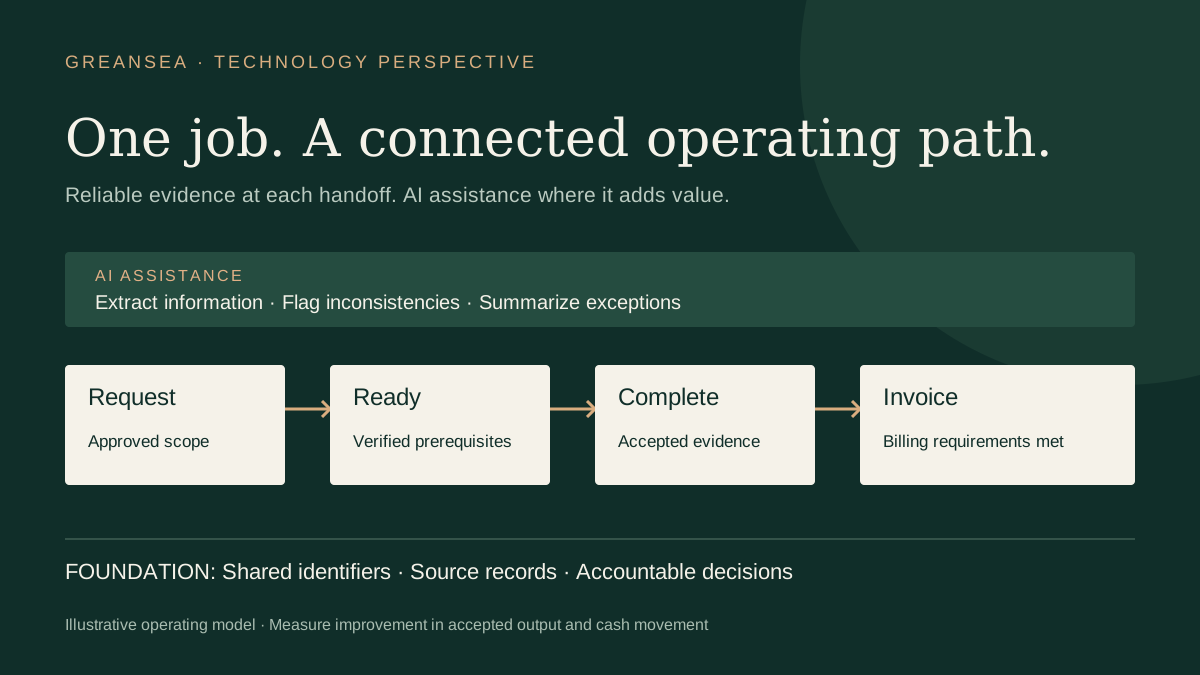
A focused integration can connect existing tools without requiring an immediate enterprise-wide replacement. Establish one job identifier, an authoritative source for each important field, agreed status definitions, and a small set of release and completion rules. A shared view should show the current evidence and its age, rather than conceal disagreements behind a green status.
Connect the handoffs that matter first: approved scope to work release, material confirmation to dispatch, completion evidence to acceptance, and acceptance to invoicing. Define how failed transfers are detected, retried, and assigned to an owner. Prevent retries from creating duplicate jobs or invoices. Give staff a workable fallback when a connection is unavailable.
Microsoft’s legacy-integration architecture illustrates data retrieval, central storage, transformation, and reporting, alongside monitoring and access controls. That is an example of technical building blocks, not proof that any particular deployment will improve throughput. [2]
Where AI assistance can help
AI can propose structured fields from scope documents, summarize a job’s exception history, flag inconsistencies for review, and help an owner find the evidence behind a hold. These uses can reduce the effort needed to understand and resolve an exception. The design should link each recommendation to its source and make uncertainty visible.
Use explicit rules and verified records for required readiness conditions. AI should not infer that a permit exists, a material shipment arrived, or a system is safe to commission simply because related text sounds plausible. Keep accountable human approval for consequential scope, commercial, release, and safety decisions. NIST identifies confidently incorrect outputs and human–AI configuration among generative AI risks. [3]
The right solution may combine ordinary integration, simple workflow rules, and selective AI assistance. Automating an unnecessary approval preserves the unnecessary approval. Simplify the operating decision before accelerating it.
An illustrative pilot: recovered time versus realized throughput
Suppose a field service company releases 80 comparable jobs a month. Twenty require manual reconciliation before dispatch, averaging 45 minutes each. A pilot using a common job record and a verified readiness check reduces those exceptions to eight. At the same handling time, monthly reconciliation falls from 15 hours to six: nine hours of capacity are recovered.
Those nine hours are not automatically a cash saving or new revenue. The company must decide how to use them. If the improvement also prevents interruptions to the constrained field crew, it may enable additional accepted jobs. That is a separate outcome to test, not an assumption to multiply into a return-on-investment claim.
Track accepted completions, ready-at-release rate, release-to-acceptance time, repeat visits, and completion-to-invoice time. Compare similar work, staffing, and demand before and during the pilot. Include software, integration, training, supervision, and ongoing support costs. These numbers describe a hypothetical scenario, not GreanSea client results.
GreanSea’s future software and integration direction
GreanSea’s future enterprise software and systems integration work will focus on removing the operating constraints that restrict throughput, reliability, margin, and cash. Our intended approach is to connect diagnostic evidence to simpler workflows, reliable records, and carefully bounded AI assistance.
This is a future development direction, not an announcement of a launched software product or an available integration platform. The starting point remains the operation: identify the governing constraint, define the required change, and validate improvement in a focused pilot before expanding the system.
From insight to action
Is your enterprise system helping work move—or making it wait?
At GreanSea, we help clients answer three important constraint questions: what to change, what to change to, and how to cause the change. Start with the evidence behind stalled jobs and test a focused response.
See how a Diagnostic can maximize throughput ↗Sources and context
- Microsoft Learn: Overview of process mining
- Microsoft Learn: Integrate legacy data
- NIST: Generative Artificial Intelligence Profile, July 2024
Sources support the technical context. The constraint analysis, design recommendations, and pilot scenario are GreanSea’s perspective.